TL;DR
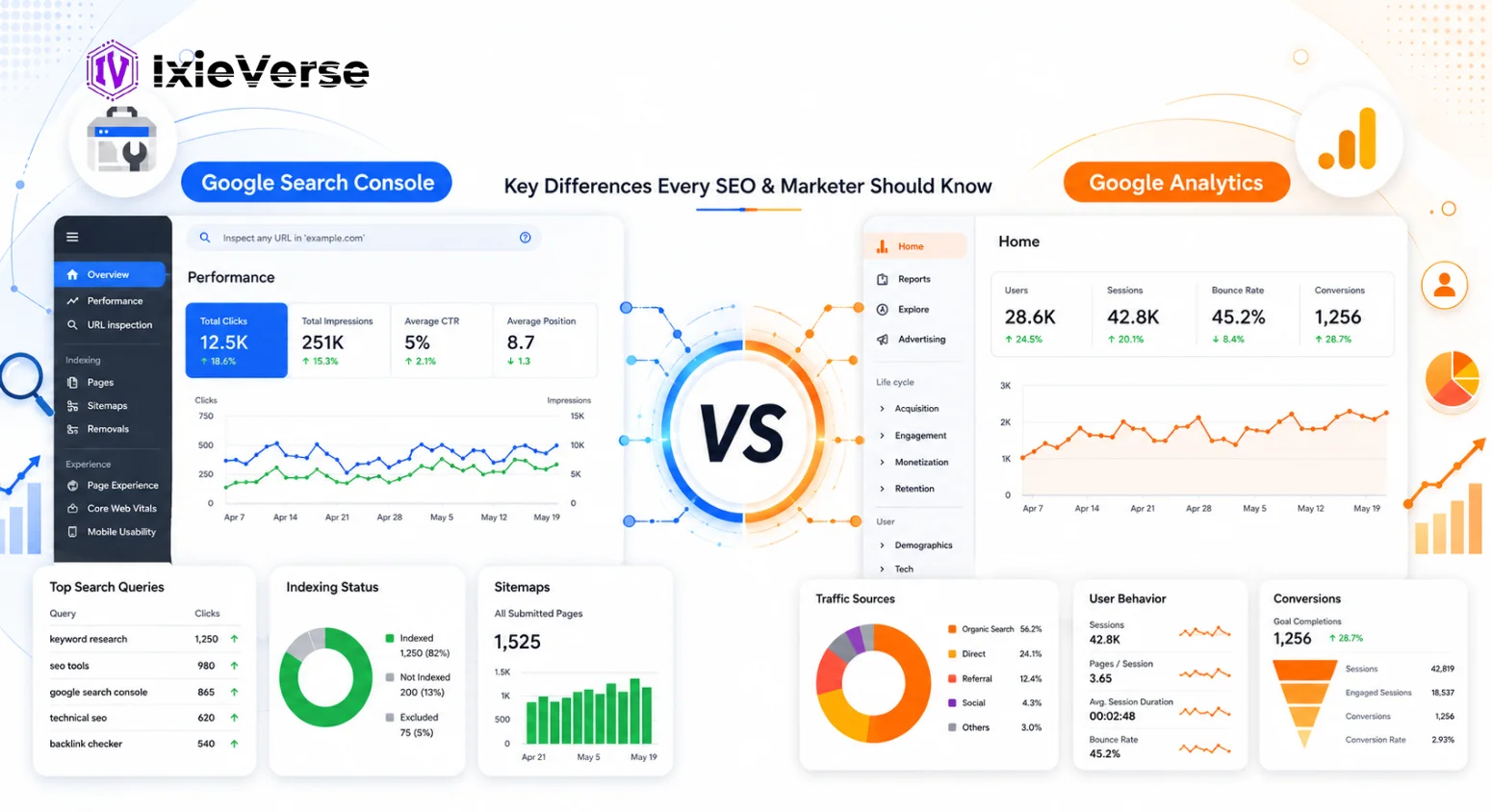
- GSC = search visibility: impressions, clicks, rankings, indexing, crawl errors.
- GA4 = user behavior: sessions, traffic sources, conversions, engagement.
- GSC only tracks Google organic search. GA4 tracks every traffic channel.
- Since June 2026, GSC has a dedicated AI Performance report for AI Overviews and AI Mode.
- Link GSC and GA4 together to see keyword data next to on-site behavior.
- Both tools are free for standard use.
Quick Answer
Google Search Console (GSC) shows how Google finds, crawls, and ranks your site in search results. Google Analytics (GA4) shows what visitors do once they land on your site. GSC covers what happens before the click; GA4 covers what happens after it. As of June 2026, GSC also shows separate AI Overview and AI Mode performance data. Most websites need both tools, not one instead of the other.
 ChatGPT
 Grok
Grok
 Claude
 Perplexity
 Google AI
- 1 What Is Google Search Console?
- 2 What Is Google Analytics (GA4)?
- 3 Google Search Console vs Google Analytics: Side-by-Side Comparison
- When to Use Each Tool
- 4 Why Do GSC and GA4 Show Different Traffic Numbers?
- 5 How to Connect Google Search Console and Google Analytics
- 6 How to Track AI Overview Traffic in Google Search Console (2026 Update)
- What Is the GSC AI Performance Report?
- 7 Which Tool Matters More for AI Search Visibility?
- 8 Conclusion: You Need Both, Not One or the Other
- 9 Frequently Asked Questions
- Which tool is better for SEO?
- Can I use Google Search Console without Google Analytics?
- Why is traffic data different between GSC and GA4?
- Does Google Search Console show conversions?
- How do I connect Google Search Console to Google Analytics?
- Does Google Analytics show keyword rankings?
- Which tool should beginners start with?
- Are both tools free in 2026?
- Do GSC and GA4 track AI chatbot traffic like ChatGPT or Gemini?
- Is GA4 replacing Google Search Console?
What Is Google Search Console?
Google Search Console is a free monitoring tool from Google that shows how your website performs specifically in Google Search. It reports impressions, clicks, average ranking position, indexing status, crawl errors, and Core Web Vitals — essentially a direct feed of how Googlebot finds, crawls, and ranks your pages.
What Is Google Analytics (GA4)?
Google Analytics 4 is a free web analytics platform that tracks what happens on your website after a visitor arrives, from any channel. It measures sessions, bounce rate, time on page, conversions, and audience demographics, and uses machine learning to flag users who are likely to convert or churn.
Google Search Console vs Google Analytics: Side-by-Side Comparison
| Feature | Google Search Console | Google Analytics (GA4) |
| Primary focus | Search visibility | User behavior & traffic |
| Data source | Google Search index | User sessions & events |
| Keyword data | Yes — queries, impressions, CTR | Only when linked to GSC |
| Traffic sources | Google Search only | All channels (organic, paid, social, direct) |
| AI Overview / AI Mode data | Yes, since June 2026 (separate report) | No native report; needs manual channel tagging |
| Conversion tracking | No | Yes — goals, events, ecommerce |
| Crawl & index issues | Yes — errors, coverage reports | No |
| Core Web Vitals | Yes | Partial, via integration |
| Audience demographics | No | Yes — age, location, device |
| Cost | Free | Free (GA4); paid tier (GA360) |
Use the free IxieVerse Robots.txt Generator to build a clean, AI-crawler-friendly robots.txt file in minutes.
When to Use Each Tool
| Goal | Use This Tool |
| Check keyword rankings or fix indexing errors | Google Search Console |
| Submit a sitemap or improve click-through rate | Google Search Console |
| Monitor Core Web Vitals | Google Search Console |
| Measure conversions or revenue | Google Analytics (GA4) |
| Compare marketing channels or audience demographics | Google Analytics (GA4) |
| Analyze on-site user journeys | Google Analytics (GA4) |
| Connect a ranking drop to a traffic drop | Both, linked together |
Why Do GSC and GA4 Show Different Traffic Numbers?
This is one of the most common points of confusion. The two tools simply count differently:
- GSC logs a click every time someone clicks your listing in Google Search results.
- GA4 logs a session, grouped in a 30-minute window, only if the tracking script loads successfully.
- Bot filtering, ad blockers, slow page loads, and users leaving before the script fires all widen the gap.
- A 10–20% variance between GSC clicks and GA4 organic sessions is normal.
- A gap larger than that usually signals a tracking problem, not real traffic loss.
How to Connect Google Search Console and Google Analytics
- In GA4, go to Admin > Property Settings > Search Console Links.
- Click “Link” and select your verified GSC property.
- Confirm the data streams you want to associate.
- Save — GSC query data now appears inside GA4’s Acquisition and Exploration reports.
- Allow 24–48 hours for the data to fully populate.
Use the free IxieVerse Robots.txt Generator to build a clean, AI-crawler-friendly robots.txt file in minutes.
How to Track AI Overview Traffic in Google Search Console (2026 Update)
Starting June 3, 2026, Google began rolling out a dedicated AI Performance report inside Search Console — first to a subset of properties, then expanding globally. This report separates impressions and clicks from AI Overviews and AI Mode out of your standard organic data, instead of blending everything into one number as before.
What it shows: You can now see which queries triggered an AI Overview that cited your page, and how those impressions compare to your regular blue-link performance. What it does not fully show yet: query-level click detail inside AI Overviews is still limited on many properties, and historical data only goes back to mid-May 2026 — there is no backfill.
What Is the GSC AI Performance Report?
The AI Performance report is a Search Console feature, rolled out from June 2026, that isolates impressions and clicks coming from AI Overviews and AI Mode. You can find it under Performance, or by filtering Search Results by Search Appearance. High impressions with low clicks usually mean the AI summary already answered the user’s question.
- Find it: Search Console > Performance > Search Results > filter by Search Appearance > AI Overview or AI Mode.
- Why clicks may fall while impressions rise: users are reading your content inside the AI summary without clicking through — this is visibility, not necessarily lost traffic.
- What to do about it: check pages with position 1 but unusually low CTR (below 2%) — these are your most likely AI Overview “read but not clicked” pages.
Which Tool Matters More for AI Search Visibility?
As of 2026, both tools play a role, and GSC now leads. GSC’s new AI Performance report is the first native, first-party view of how often your content is surfacing inside AI Overviews and AI Mode. GA4 still cannot separate AI-referred traffic (from ChatGPT, Perplexity, or Gemini) from regular referral or direct traffic unless you manually build a custom channel group for domains like chatgpt.com, perplexity.ai, and gemini.google.com. The practical approach: use GSC’s AI Performance filter as your primary AI-visibility signal, and build a custom “AI Referrals” channel in GA4 to catch traffic from AI chat tools that isn’t tied to Google Search.
Conclusion: You Need Both, Not One or the Other
Google Search Console tells you how Google — and now Google’s AI systems — see your site. Google Analytics tells you how people actually use it once they arrive. Neither tool replaces the other; together, they show the full journey from search impression to conversion. Set both up, link them, and check them weekly. In 2026, add one more habit: review GSC’s AI Performance report monthly, since AI-driven search is the fastest-growing part of this landscape and the one most likely to keep changing.
Want your content structured so AI engines like ChatGPT, Gemini, and Perplexity can actually extract and cite it? Try the free IxieVerse Schema Generator to add FAQ and Article markup in minutes.
Frequently Asked Questions
Which tool is better for SEO?
GSC is the primary SEO tool — it shows rankings, keyword queries, indexing status, and technical issues. GA4 is better for measuring what happens after someone finds you: conversions, revenue, and engagement.
Can I use Google Search Console without Google Analytics?
Yes. GSC works completely on its own. You’ll miss on-site behavior data, but for basic SEO monitoring, GSC alone is enough to get started.
Why is traffic data different between GSC and GA4?
GSC counts search clicks; GA4 counts sessions. The gap comes from JavaScript failures, bot filtering, session timing, and non-Google traffic GSC never records. See the section above for details.
Does Google Search Console show conversions?
No. GSC has no goal or event tracking. For conversions, use GA4 or another analytics platform.
How do I connect Google Search Console to Google Analytics?
In GA4, go to Admin > Property Settings > Search Console Links, then link your verified property. See the step-by-step guide above.
Does Google Analytics show keyword rankings?
Not on its own. GA4 shows search queries only when linked to GSC, and it never shows ranking position — that data lives exclusively in GSC’s Performance report.
Which tool should beginners start with?
Start with Google Search Console. It’s simpler, free, and gives immediate SEO feedback. Add GA4 once you’re ready to track behavior and conversions.
Are both tools free in 2026?
Yes. GSC is fully free. GA4 is free for standard use; GA360 is a paid enterprise tier with higher data limits.
Do GSC and GA4 track AI chatbot traffic like ChatGPT or Gemini?
Not automatically. GSC shows some AI Overview data inside Google Search. GA4 groups AI referral traffic under “referral” or “direct” unless you build a custom channel group for AI domains.
Is GA4 replacing Google Search Console?
No. The two tools serve different jobs, and Google has given no indication of merging them. Most SEO and marketing teams run both side by side.



![50 Best Website Design Examples for Inspiration [2026]](https://ixieverse.com/wp-content/uploads/2026/08/Best-Website-Design-Examples-150x150.webp)
Add a Comment