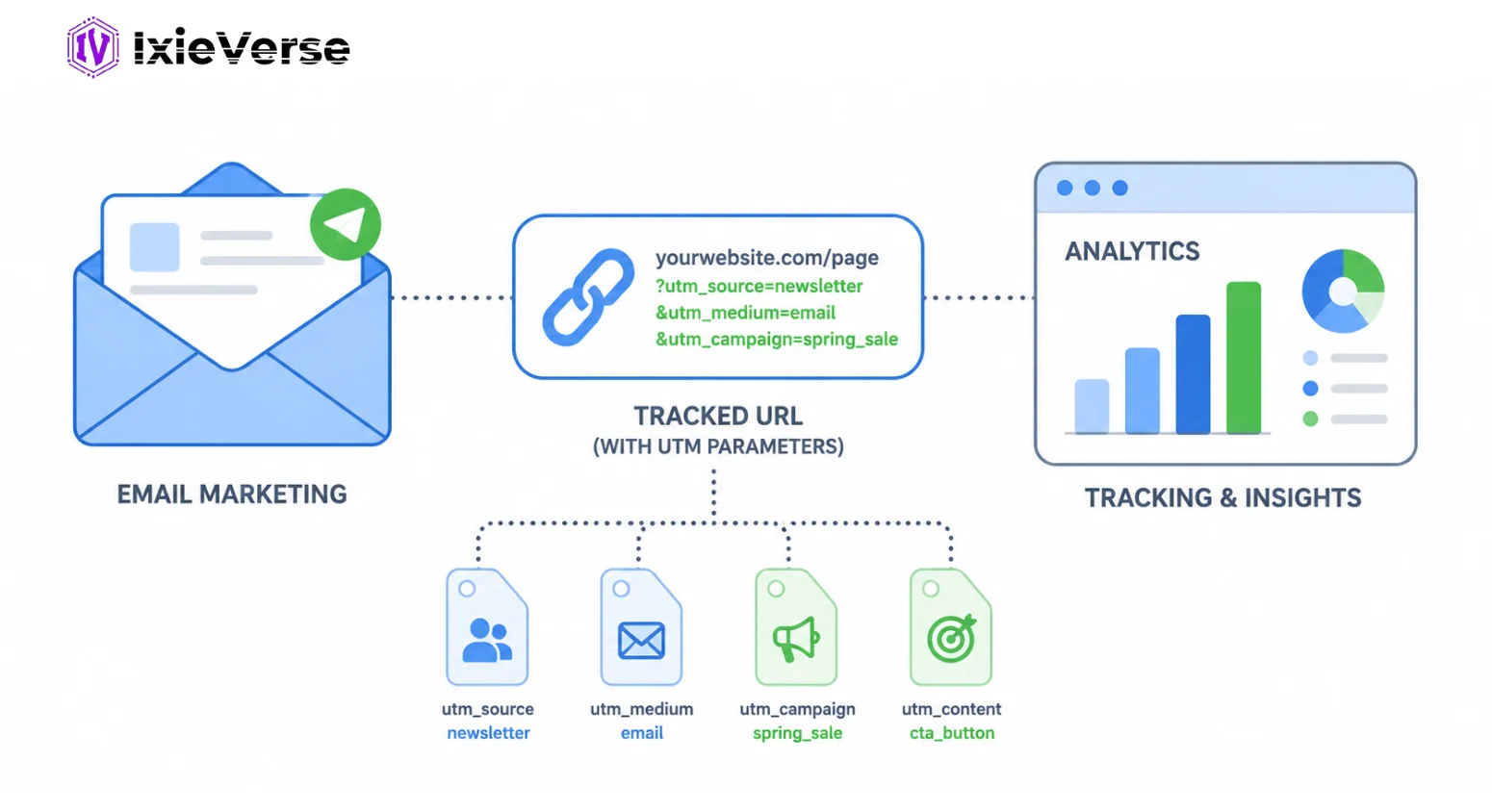
You send an email campaign. Open rates look solid. Clicks are happening. But when you open Google Analytics, you see a sea of “(direct)” traffic with no clear story about what actually converted.
That is the problem UTM parameters solve.
In 2026, as email marketing remains one of the highest-ROI channels available, understanding where your traffic comes from and what it does after the click is non-negotiable. With AI-powered email platforms, automated flows, and multi-touch attribution becoming standard, UTM parameters are the connective tissue between your email sends and your analytics data.
This guide walks you through exactly what UTM parameters are, how to build them for email, and how to use them strategically to improve campaign performance.
TL;DR Summary
UTM parameters are short snippets of text added to the end of URLs in your email links. They tell Google Analytics (and other analytics tools) exactly where a visitor came from, which campaign sent them, and what they clicked. In email marketing, properly set UTM parameters allow you to measure campaign ROI, compare performance across sends, and make data-driven decisions about future content.
This guide covers what UTM parameters are, how to build them correctly, a step-by-step setup process, best practices for 2026, and common mistakes to avoid.
 ChatGPT
 Grok
Grok
 Claude
 Perplexity
 Google AI
- 1 What Are UTM Parameters?
- 2 The 5 Core UTM Parameters Explained
- What should utm_medium be for email?
- What should utm_source be for email?
- 3 How to Use UTM Parameters in Email Marketing: Step-by-Step
- Step 1: Define Your Naming Convention
- Step 2: Use a UTM Builder Tool
- Step 3: Build Your UTM URL
- Step 4: Shorten Long UTM URLs (Optional but Recommended)
- Step 5: Insert UTM Links into Your Email
- Step 6: Test Before You Send
- Step 7: Analyze Results in Google Analytics 4
- 4 UTM Parameter Best Practices for Email Marketing in 2026
- 5 UTM Parameters vs. ESP Native Tracking: Key Differences
- 6 Common UTM Parameter Mistakes (And How to Avoid Them)
- Mistake 1: Inconsistent Capitalization
- Mistake 2: Tagging Every Single Link the Same Way
- Mistake 3: Using UTM Parameters on Internal Links
- Mistake 4: Skipping Testing
- Mistake 5: No Documentation
- 7 Conclusion
- 8 Frequently Asked Questions
- Q1: Do UTM parameters affect email deliverability?
- Q2: Should I use UTM parameters with Mailchimp, Klaviyo, or HubSpot?
- Q3: What is the right value for utm_source in email marketing?
- Q4: How do I track UTM parameters in Google Analytics 4?
- Q5: Can UTM parameters be used in automated email sequences?
- Q6: What is the difference between utm_source and utm_medium?
- Q7: Do I need UTM parameters if my ESP already tracks clicks?
- Q8: What happens if I forget to add UTM parameters to an email link?
What Are UTM Parameters?
UTM parameters (Urchin Tracking Module parameters) are tags added to the end of a URL that pass campaign data to analytics platforms like Google Analytics 4. When someone clicks a UTM-tagged link, the parameters are captured and attributed to the corresponding session, allowing marketers to identify the exact source, medium, and campaign driving traffic and conversions.
Example of a UTM-tagged email link:
https://yoursite.com/landing-page?utm_source=newsletter&utm_medium=email&utm_campaign=summer_sale_2026
The 5 Core UTM Parameters Explained
| Parameter | What It Tracks | Email Example | Required? |
| utm_source | Who sent the traffic | newsletter | Yes |
| utm_medium | The marketing channel | Yes | |
| utm_campaign | The specific campaign name | summer_sale_2026 | Yes |
| utm_content | Which link or CTA was clicked | hero_cta_button | Optional |
| utm_term | Keyword (mainly for paid search) | email_subscriber | Rarely used |
What should utm_medium be for email?
The correct value for utm_medium in email marketing is “email” (lowercase). This is the industry standard recognized by Google Analytics and most analytics platforms. Using variations like “Email”, “EMAIL”, or “e-mail” creates separate traffic channels in your reports, fragmenting your data.
What should utm_source be for email?
utm_source identifies the specific sender or list. Common examples include:
- newsletter (for regular email newsletters)
- mailchimp (if using the ESP name as source)
- drip_sequence (for automated flows)
- transactional (for receipt or account emails)
Consistency across your team matters more than the exact naming convention you choose. Pick one and document it.
Stop building UTM links manually. Create clean, trackable campaign URLs in seconds with the IxieVerse UTM Builder. Generate accurate UTM parameters for your email campaigns, improve attribution, and measure marketing performance with confidence.
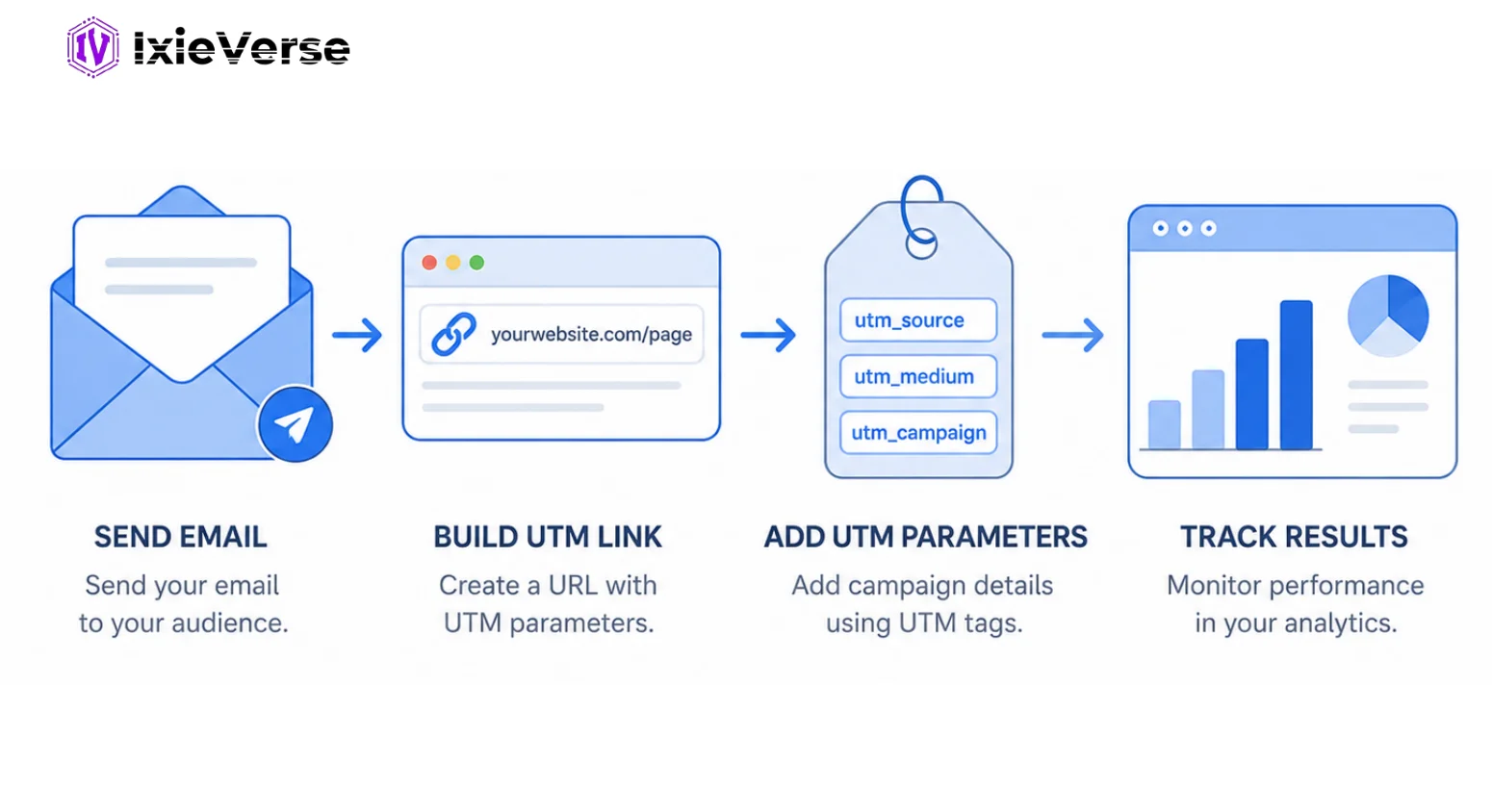
How to Use UTM Parameters in Email Marketing: Step-by-Step
Step 1: Define Your Naming Convention
Before building any UTM links, establish a consistent naming system. Decide:
- Will source reflect the ESP name or the email type (newsletter, promo, drip)?
- Will campaign names use underscores or hyphens?
- Will you use lowercase only? (Recommended: yes, always)
- Who on your team is responsible for creating and approving UTM links?
Document this in a shared spreadsheet or wiki. Naming inconsistency is the number one cause of messy analytics data.
Step 2: Use a UTM Builder Tool
Do not type UTM parameters manually into URLs. Use a builder to avoid typos and formatting errors.
Recommended UTM builder tools:
- Google Campaign URL Builder (free, at ga-dev-tools.google.com)
- IxieVerse UTM Builder (Free and No Sign-up)
- Mailchimp Campaign URL Builder (built into Mailchimp)
- UTM.io or RavenTools UTM Builder (for teams)
- A shared Google Sheet with CONCATENATE formulas (simple and highly effective)
Step 3: Build Your UTM URL
Fill in the following fields in your chosen builder:
- Website URL: The destination page URL (no trailing slash)
- Campaign Source: e.g., newsletter
- Campaign Medium: email (always lowercase)
- Campaign Name: e.g., black_friday_2026
- Campaign Content (optional): e.g., header_cta or footer_link
Your builder will output a complete URL like:
https://yoursite.com/sale?utm_source=newsletter&utm_medium=email&utm_campaign=black_friday_2026&utm_content=header_cta
Step 4: Shorten Long UTM URLs (Optional but Recommended)
Long UTM URLs can appear in plain-text emails and look messy. Use a URL shortener or redirect:
- Bitly or Rebrandly for branded short links
- Your own domain redirects (e.g., yoursite.com/sale2026) pointing to the full UTM URL
- Note: Do NOT use link shorteners that mask the destination domain entirely, as some email filters may flag them
Step 5: Insert UTM Links into Your Email
Replace all destination links in your email with UTM-tagged versions. Key areas to tag:
- Primary CTA buttons
- Text hyperlinks in body copy
- Image links
- Footer links (unsubscribe excluded)
- Navigation menu links (if present in email header)
Use utm_content to differentiate between multiple links pointing to the same destination within a single email.
Step 6: Test Before You Send
Before sending to your list:
- Click every UTM link in a test email
- Verify the destination page loads correctly
- Check Google Analytics 4 real-time report to confirm parameters are being captured
- Confirm the utm_source, utm_medium, and utm_campaign values appear correctly under Traffic Acquisition
Step 7: Analyze Results in Google Analytics 4
After your campaign sends, navigate to:
Reports > Acquisition > Traffic Acquisition (or Campaign report under Advertising > Campaigns)
Filter by Session medium = email to see all email-driven sessions. Then break down by utm_campaign and utm_content to evaluate individual email performance.
Key metrics to review:
- Sessions from email
- Engagement rate
- Conversions (goal completions)
- Revenue attributed to email traffic (for ecommerce)
Explore: How to Track Marketing Campaigns Like a Pro
UTM Parameter Best Practices for Email Marketing in 2026
- Always use lowercase for all UTM values. Analytics platforms are case-sensitive.
- Use underscores instead of spaces in campaign names (spaces become %20 in URLs and break readability).
- Never tag unsubscribe, preference center, or legal links with UTM parameters.
- Use utm_content to A/B test CTA positions and link placements within the same email.
- Keep a master UTM spreadsheet shared across your marketing team.
- Audit your UTM data quarterly to catch naming drift before it compounds.
- For automated email sequences, include the sequence name and step number in utm_campaign (e.g., welcome_seq_step3).
- For transactional emails, tag links that lead back to marketing pages (not transactional actions).
Ready to track every email click accurately? Use the IxieVerse UTM Builder to generate custom UTM links instantly and gain deeper insights into your campaign performance—without the hassle of manual tagging.
UTM Parameters vs. ESP Native Tracking: Key Differences
| Feature | UTM Parameters | ESP Native Tracking |
| Where data lives | Google Analytics / your analytics platform | Inside the ESP dashboard only |
| Cross-channel comparison | Yes – compare email vs. paid vs. organic | No – email-only view |
| Conversion tracking | Full funnel in GA4 | Limited to clicks and opens |
| Setup required | Manual or templated | Automatic within ESP |
| Attribution accuracy | High (tied to your analytics goals) | Medium (ESP-defined metrics) |
| Revenue attribution | Yes (with GA4 ecommerce) | ESP-dependent |
Bottom line: ESP native tracking and UTM parameters are complementary, not competing. Use both. Your ESP tells you who opened and clicked. UTM parameters tell you what happened after the click.
Discover: Best Digital Marketing Software: 30+ Tools to Grow Your Business in 2026
Common UTM Parameter Mistakes (And How to Avoid Them)
Mistake 1: Inconsistent Capitalization
“Email”, “email”, and “EMAIL” appear as three separate channels in GA4. Standardize on lowercase across your entire organization.
Mistake 2: Tagging Every Single Link the Same Way
If every link in your email uses identical UTM parameters, you lose visibility into which CTA drove the click. Use utm_content to differentiate links within the same email.
Mistake 3: Using UTM Parameters on Internal Links
Adding UTM parameters to links that go from one page to another on your own website resets the session source in GA4. Only use UTM on links inside emails pointing to your website.
Mistake 4: Skipping Testing
A broken UTM link sends untagged traffic that appears as direct in your reports. Always test every link in a real email client before sending.
Mistake 5: No Documentation
Without a shared naming convention document, different team members will create different UTM strings for the same campaign, polluting your analytics with fragmented data.
Conclusion
UTM parameters are one of the simplest, highest-impact tools in an email marketer’s toolkit. They take less than five minutes to set up correctly, and they transform your email analytics from surface-level open-and-click data into a full-funnel attribution picture.
In 2026, as marketing budgets face increased scrutiny and every channel needs to justify its ROI, the teams that can accurately connect email sends to revenue will have a significant strategic advantage. UTM parameters are how you build that case.
Start with a consistent naming convention, build a shared UTM tracking spreadsheet, and tag every send from this point forward. Within a few months, you will have clean, reliable data to inform every email strategy decision you make.
Frequently Asked Questions
Q1: Do UTM parameters affect email deliverability?
No. UTM parameters are text appended to URLs, not embedded code. They do not affect email deliverability scores or spam filter outcomes. However, very long URLs in plain-text emails may look suspicious to readers; use URL shorteners or redirects in those cases.
Q2: Should I use UTM parameters with Mailchimp, Klaviyo, or HubSpot?
Yes. While these ESPs have their own click tracking, they do not push data into Google Analytics automatically. Adding UTM parameters ensures your GA4 reports accurately reflect email-driven traffic, conversions, and revenue. Some ESPs like Mailchimp offer built-in UTM auto-tagging – enable this feature and customize the campaign values.
Q3: What is the right value for utm_source in email marketing?
The utm_source should identify where the email came from. Common values include: newsletter, mailchimp, klaviyo, hubspot, or the specific email list name. Whatever you choose, use it consistently across all campaigns so your data aggregates cleanly.
Q4: How do I track UTM parameters in Google Analytics 4?
In GA4, go to Reports > Acquisition > Traffic Acquisition. Select “Session medium” as your primary dimension and filter for “email”. To see campaign-level data, switch the dimension to “Session campaign”. For content-level data, use “Session manual ad content” as the dimension.
Q5: Can UTM parameters be used in automated email sequences?
Yes, and they are especially valuable in automation. Tag each step in your sequence with a unique utm_campaign value (e.g., onboarding_seq_day1, onboarding_seq_day7). This lets you see which step in an automated flow drives the most conversions.
Q6: What is the difference between utm_source and utm_medium?
utm_source identifies the specific origin of traffic (e.g., your newsletter, a specific ESP, or a partner). utm_medium identifies the marketing channel category (e.g., email, social, cpc). Think of medium as the highway and source as the on-ramp.
Q7: Do I need UTM parameters if my ESP already tracks clicks?
Yes. ESP click tracking operates within the ESP’s own system and does not integrate with your website analytics or conversion data. UTM parameters bridge the gap between the email click and what the visitor does on your website, enabling true ROI measurement.
Q8: What happens if I forget to add UTM parameters to an email link?
Untagged email traffic typically appears as “(direct) / (none)” in GA4, inflating your direct channel and hiding the true contribution of email to your traffic and conversions. This makes it impossible to accurately measure email ROI.




![50 Best Website Design Examples for Inspiration [2026]](https://ixieverse.com/wp-content/uploads/2026/08/Best-Website-Design-Examples-150x150.webp)
Add a Comment